How Virtual Gemba Walks Save Time and Reduce Floor Disruption

Continuous improvement is the foundation of lean manufacturing. Traditionally, Gemba walking is the presence of managers at their subordinates' workstations. This practice enables leaders to identify and eliminate waste, gain a better understanding of the company's processes, participate in continuous improvement activities, monitor compliance with health and safety rules, and build relationships and motivate employees.
However, bringing a group of managers and executives onto an active production floor presents its own set of challenges. It requires everyone to suit up in personal protective equipment, it can distract machine operators, and it often relies on manual notes jotted down on a clipboard. By utilizing a 3D digital twin, modern industrial leaders are moving this critical lean practice onto their screens, allowing for deep analysis without the physical disruption.
The Operational Benefits of a Virtual Walk
A virtual Gemba walk takes the core principles of the traditional method and applies them to a highly accurate 3D replica of your facility. Instead of physically walking down a production line, managers navigate a digital twin using a standard web browser.
This approach minimizes disruption on the actual production floor. Large groups of executives walking through active assembly areas can distract operators and slow down output. A virtual walkthrough keeps the focus on the layout and the data without physically crowding the workspace or creating safety concerns. Furthermore, it allows managers to instantly pull up live IoT sensor data for the machines they are observing, bridging the gap between physical observation and data analytics.
Standardizing Routes with Path Manager
To standardize these digital tours, Moicon features a Path Manager, which is used to create a path that carries information value. The path can be used for many tasks, such as gemba walk, material flow, or employee training.
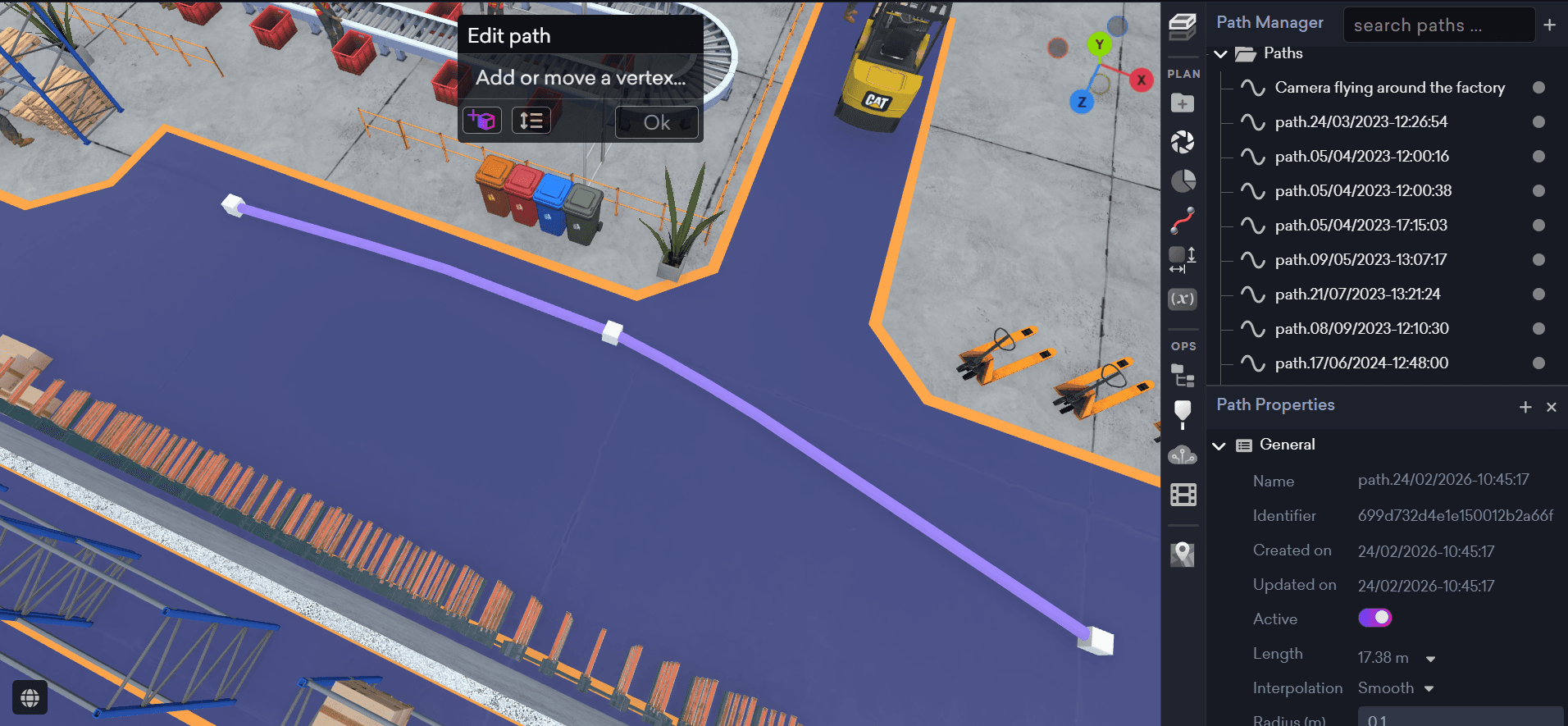
Instead of randomly clicking around a massive 3D model, facility managers can draw specific routes through the plant. During the meeting, the Kiosk is a tool for creating visual walkthroughs, providing a clearer sense of proportions, layout, and spatial understanding within a building or factory. To maintain a first-person perspective, you simply use the Path walk mode. This simulates the exact viewpoint a manager would have if they were physically standing on the floor.
Highlighting Issues with Digital Markups
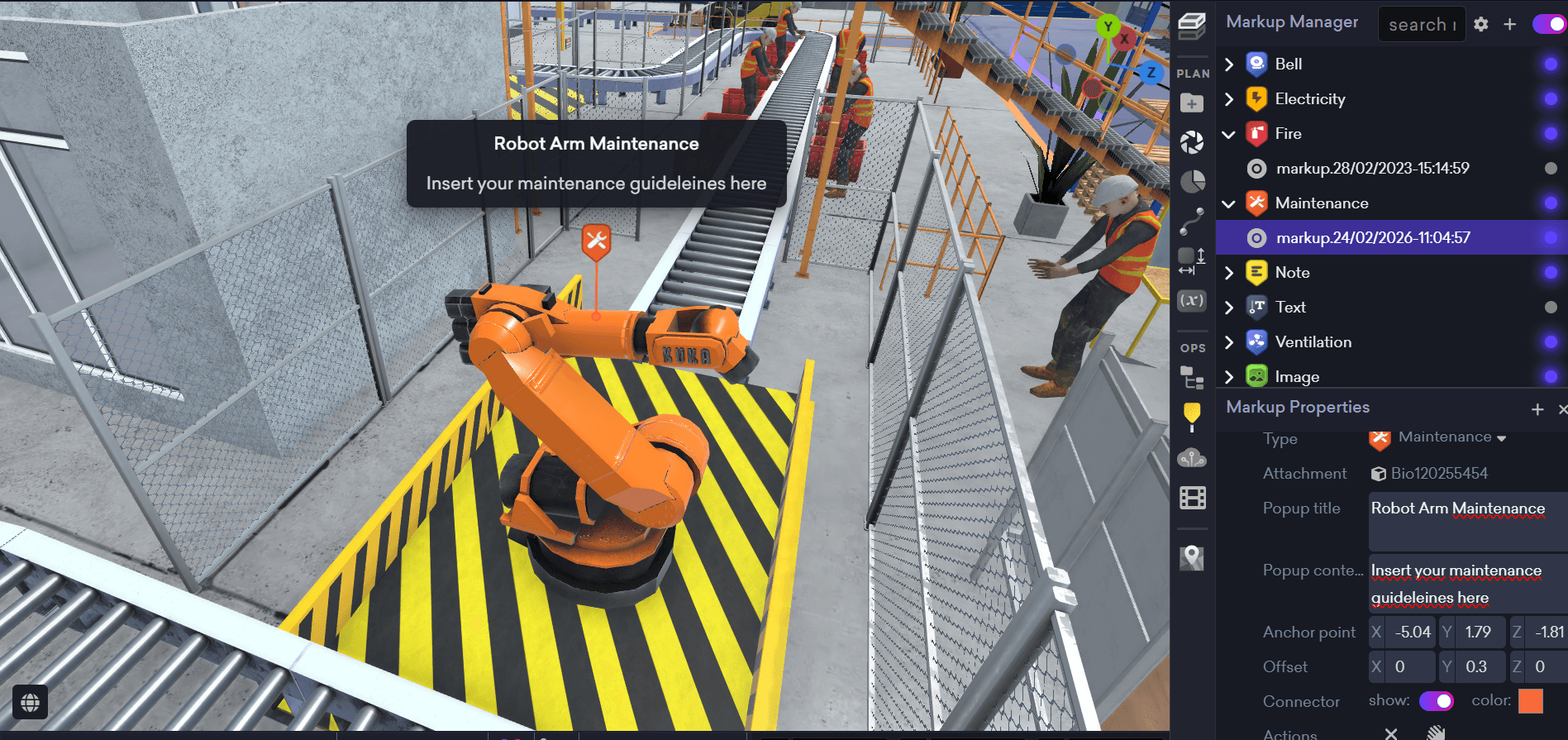
Alt text: Adding visual indicators and notes to specific machines using the Moicon Markup Manager. Caption: Tag points of interest with specific icons to track maintenance and safety tasks.
Identifying a bottleneck or safety hazard is only the first step. You also need a way to document and share that finding with the rest of your organization.
The Markup Manager is a tool used for adding visual indicators to your 3D model. You can add various icons, text, and images to help you communicate with other users of your organization. While navigating your virtual Gemba walk, you can easily tag a point of interest, which could be a machine, a piece of equipment or a specific location in the factory. Mark these key places to stay in sync with other users of your organization.
You can drop specific icons directly onto the 3D machinery, choosing from types like maintenance, electricity, fire, ventilation, or general notes. These visual tags ensure that when the local maintenance team logs into the digital twin, they see exactly which machine requires attention and can read the notes left by the operations director.
Modernize Continuous Improvement Today
You do not need to disrupt your operators to optimize your facility. By bringing your factory into a browser based digital twin, your leadership team can participate in continuous improvement activities directly from their desks.
Visit our Help Center to learn more about setting up your first digital path, or book a meeting with us today to see how Moicon can modernize your lean manufacturing strategies.


